chatbox: Hermes/OpenClaw Based Voice Assistant
A Pi Zero W, a 3D printer display board, and a microphone in a printed wedge: press the knob, ask out loud, and the answer streams onto a 128×64 LCD or to an Amazon Echo. Keep it it local.
Before 3d printers got awesome I used to built my own or customize the heck out of my Ender 3, as a result I have a bunch of old parts sitting around so last weekend I decided to put it to use to act as a household AI assistant.
It has one real job: press the knob, ask out loud, read the answer..
Code, case, and wiring are all here: github.com/drkpxl/chatbox
The star of the show
The display is a BigTreeTech Mini12864 which is a part made for 3D printers, not for this. And it is an absurdly good deal for what I needed, A: Because I already had it but also because BTT put four things on one PCB: a 128×64 LCD, a rotary encoder with a push switch, three addressable WS2812 LEDs, and a piezo buzzer. One board, one bundle of jumper wires, and I have a screen, an input device, a status light, and a speaker.
Add a Raspberry Pi Zero W, an INMP441 I2S microphone, and about 150g of filament. Nineteen jumper leads, and the microphone's pads are the only soldering.
Its all cheap/spare parts
The architecture is pretty simple. and works with the low end hardware.
knob press ──> record to RAM (16 kHz mono WAV, never touches the SD card)
           ──> POST the audio to a transcription endpoint  ──> text
           ──> POST that text to a chat endpoint (SSE)      ──> tokens
           ──> draw them as they arrive
That's the whole thing. The box records, uploads, and renders. All the intelligence is a Hermes Agent host on my LAN, but nothing in the Pi code is Hermes-specific, it's just a multipart upload and an OpenAI-compatible /v1/chat/completions stream. Any Whisper-style transcriber and any OpenAI-shaped chat endpoint will drop in.
Because it streams, the answer starts appearing while the model is still writing it, which matters a lot on a screen this small. And an X-Hermes-Session-Id header scoped to the service run means consecutive questions continue a warm thread instead of starting cold every time.
Text that holds still
Long answers page rather than scroll. Each chunk sits still for a few seconds and then cuts to the next one.
The knob's LEDs carry the state, so you're never wondering whether it heard you — blue while listening, pulsing blue while transcribing, breathing amber while thinking, green while streaming, a double-pulse when it's done, red when it isn't.
It can also just say it
I also added Speak answers to the UI, pick a speaker available in Home Assistant, and the box stops drawing text entirely. It hands the finished answer to Home Assistant and shows an animated speaker icon. Same reasoning as the paging, if you asked out loud, you shouldn't then have to read if you don't want to.
Two things I learned wiring that up. Home Assistant acknowledges a TTS call immediately, so the box never learns when the speaker actually stops talking — the animation runs on a 150-wpm word-count estimate and a click cuts it short. And long answers get split into ~240-character chunks on sentence boundaries, because Alexa's notify TTS silently truncates past some length that moves between releases.
If HA refuses the call, it falls back to the text screen and plays the error tone.
What it does when I'm not talking to it
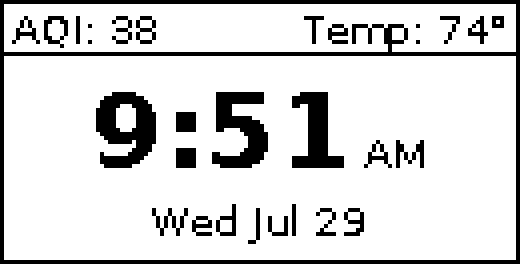
Most of the day it's a clock with the two readings I'd otherwise unlock my phone for.
But in the morning I genuinely don't care what time it is. I care whether I need a coat, whether the air is bad, and what I already said yes to. So between 6 and 9 the clock shrinks down to the bottom row and the whole middle of the screen becomes the day:
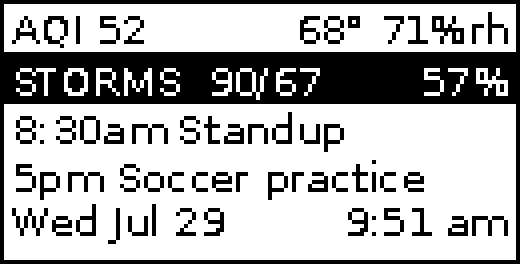
Air quality and what it's actually like outside on top, then today's sky with the high, the low and the chance of rain, then whatever's on the shared calendar. All of it comes out of Home Assistant, an Acurite 5-in-1 in the yard for temperature and humidity, Apple Weather through HA for the forecast, and our shared calendar for the events.
The two things actually worth interrupting me over get the same treatment: the row flips to white-on-black and the knob LEDs light up, so I can read it from the doorway before I'm close enough to make out 10px type. Storms go amber. Bad air gets the EPA's own color scale and outranks the weather, because I can dress for a storm.
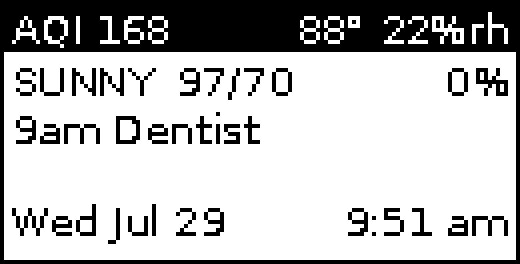
There's no color and no second font size worth having on a 1-bit panel, so throwing the row negative is the only emphasis left that still works across a room.
One thing that surprised me: the sky row originally read rain 57% and the word "rain" cost 24 pixels of a 124 pixel row. It technically fit, with 1.8px between the two columns, which rendered as 90/67rain 57% and read as one word. Dropping four characters fixed it. On a screen this small the layout is a budget, and you find out by looking, not by doing the arithmetic.
The case is code
The enclosure is a 45° wedge, 143 × 82 × 65 mm, and it's a parametric build123d script.
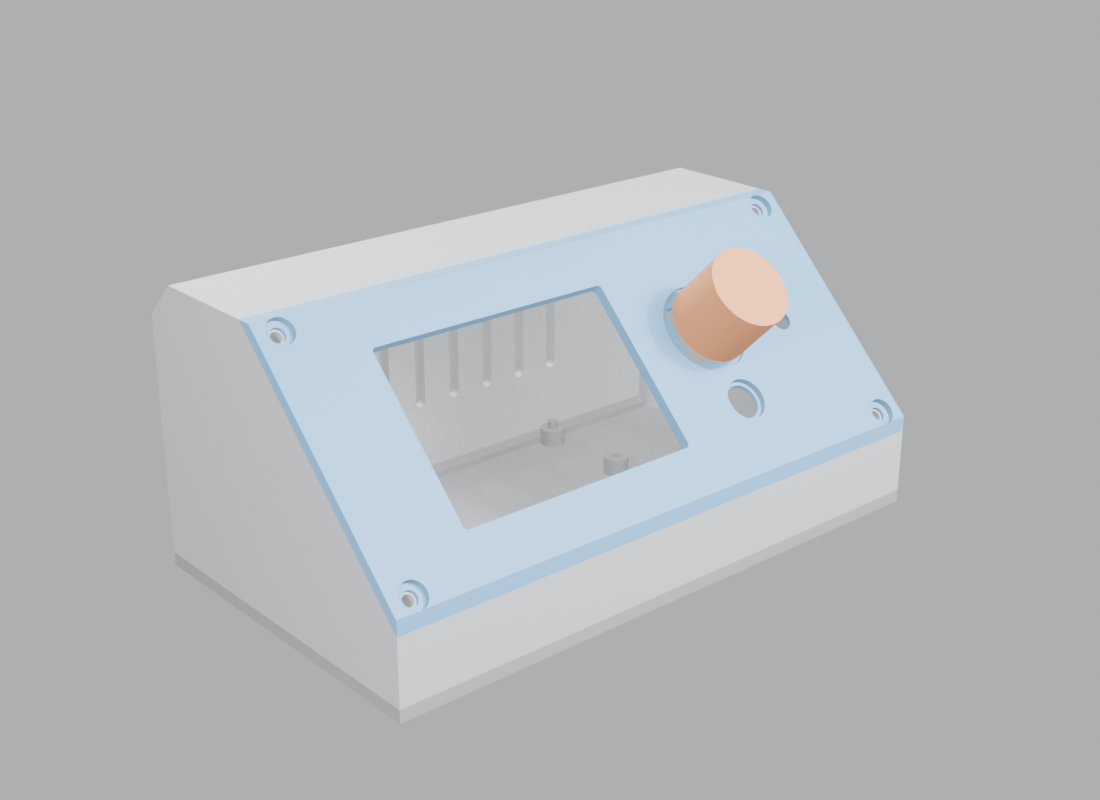
All four parts print without supports. The image above is a render.
Build one yourself, PR welcome!
Everything's in the repo: wiring tables and assembly, install and architecture, the case source with print-ready STLs, and the diagnostic scripts I used for bring-up. Roughly $40 of parts if you have a printer and a spare Pi.